Home / Platform
PlatformEverything to run, track and report on training.
Online, classroom and mobile learning for teams across sites. Technical detail is in Deployment, access and integrations.
Learning people finish.
- Paths with online and classroom stepsModules, sessions and quizzes in one route per role.
- Mobile app, online or offlineLessons download for the shop floor, the field and travel.
- Streaks, challenges and leaderboardsPlus scores and badges.
- English and ArabicSee languages under For IT for what’s covered.
- Welcome to the companyDone
- Policies and POSHDone, quiz 9/10
- Site safety walk-throughClassroom, Pune, Thu 10:00
- Product basicsDownloaded for offline
Not a product screen
Less admin across every site.
- Enrol in bulkBy group, or let people register themselves.
- Site and department adminsEach sees and manages only their own people.
- Classroom schedulingSessions, cohorts and instructor chat.
- Practical AI toolsA few today for learners and admins, with more coming. See what’s coming.
- GurgaonAll started
- Pune2 not started
- ChennaiAll started
Pune site admin follows up with 2 joiners
Not a product screen
Know who needs help before the deadline.
- Course progressCompleted and not yet, course by course.
- SCORM and quiz resultsGrades and scores, not just clicks.
- Scheduled reportsExcel or PDF to the inboxes you choose.
- Custom reportsBuilt to your specification on Enterprise.
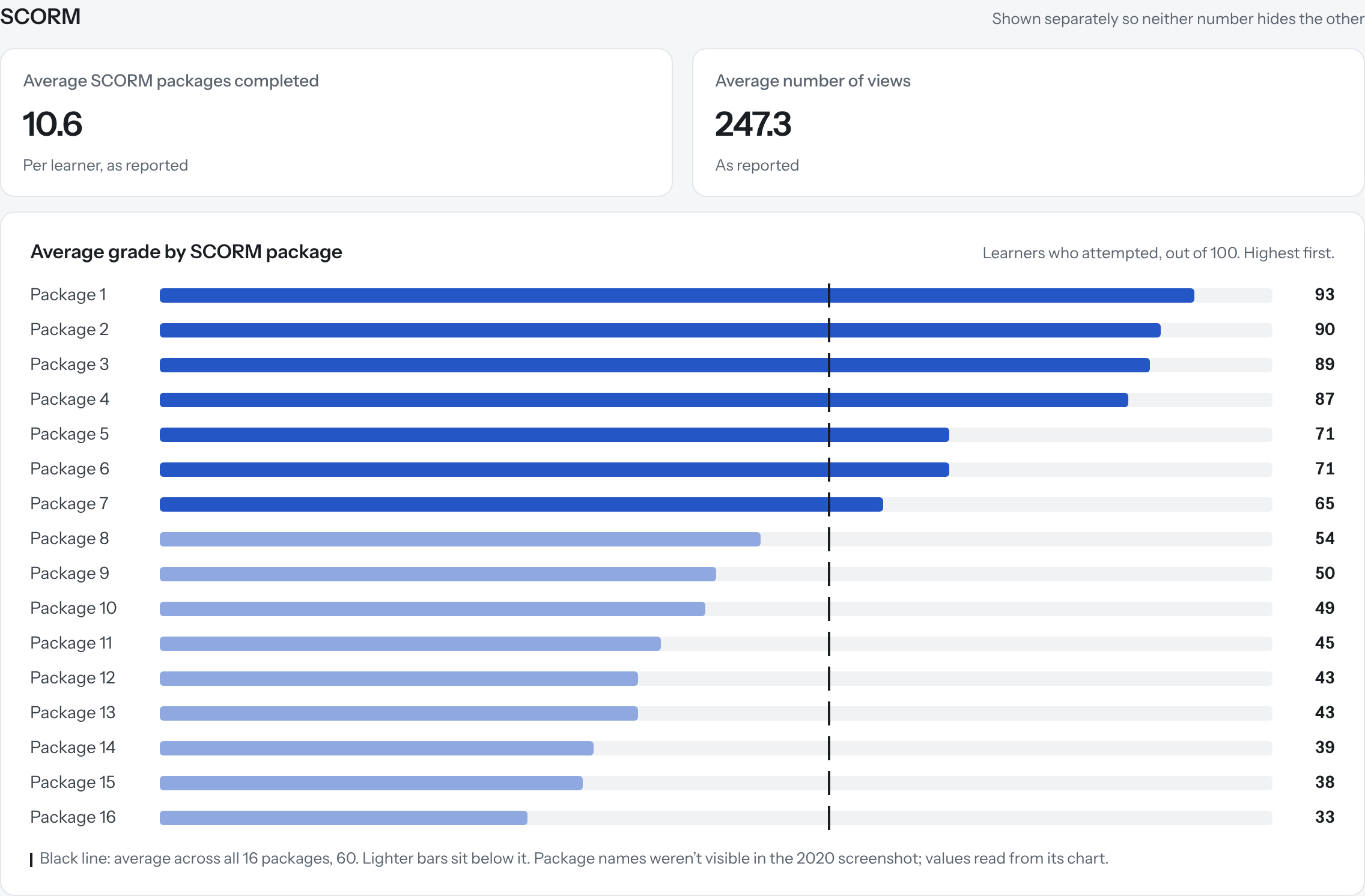
Average grade per SCORM package, against the overall average.Report preview: redesigned layout with 2020 sample data. The released product may differ.
AI for learning design, assessment and practice.
Who uses each capability, what they provide, what it produces, and where a person reviews the result.
| Capability | Who uses it | What they provide | What it produces | Where a person reviews |
|---|---|---|---|---|
| Question writingComing to LearningPin | L&D admins | Approved learning material: a module, a document or an SOP | Draft quiz and assessment questions | The admin reviews and edits every question before it’s used. |
| Structured learning draftsComing to LearningPin | L&D admins | Documents, presentations, SOPs or subject-matter notes | A draft with learning objectives, topics and a suggested sequence | The admin edits the draft before it becomes a course. |
| Role-play practiceComing to LearningPin | Learners | A scenario set up by L&D, such as a customer objection or a feedback conversation | A conversation to practise | L&D chooses the scenarios. How learners open role-plays and where their records appear will be confirmed at launch. |
| Custom AI toolsScoped separately with K2B Learning | K2B Learning with your team | A training or business workflow you want to support | A tool scoped to that workflow | Agreed with you as a separate engagement. |
Not part of current plan inclusions. Availability, pricing, file handling, permissions, data retention and how your content is used will be confirmed in writing before launch.
Deployment, access and integrations
What’s confirmed today, and what we confirm in writing for your deployment.
- Hosting
- LearningPin runs on Amazon Web Services (AWS).Data region and residency for your deployment: confirmed in writing on request.
- Sign-in
- Single sign-on with your organisation’s accounts is available, alongside LearningPin accounts and optional self-registration.Tell us your identity provider and we’ll confirm the set-up.
- Access
- Role-based permissions. Site and department admins see only their own people and courses.
- Content
- SCORM 1.2 packages, video, documents and links.Ask us about any other standard you use.
- Integrations
- HR systems and single sign-on are set up as an optional integration service, scoped with you. Zoom integration and Vimeo video hosting are also available.
- Migration
- Standard migration of users and course data is part of every plan: prepared, uploaded and checked with you.Large moves across several platforms: optional advanced migration.
Languages
- Learner and admin interface
- English and Arabic
- Right-to-left layout, notifications and certificates
- Confirmed for your set-up in the demo
- Course translation and localisation
- Optional service, 65 languages
Service levels, security certifications and penetration testing: bring your questionnaire to the demo and we’ll answer it for your deployment.
See it running with your own programmes.
One demo for L&D, HR and IT. Prefer to talk? Call +91 9910902616.